
I have a Windows based VMware SRM service running with integrated PostgreSQL server on Windows.
Recently, SRM service went down and thus I started to investigate. Upon checking , SRM service was not running and I tried to start it manually resulting in below error.
“Windows Could not start the service , terminated Unexpectedly”
Cause:
Checked in the SRM logs and found that the SRM service is crashing because of the PostgreSQL backtrace as below:
–> Panic: Assert Failed: “ok (Dr::Providers::Abr::AbrRecoveryEngine::AbrRecoveryEngineImpl::LoadFromDb: Unable to insert post failover info object 105441 for group vm-protection-group-11767 array pair array-pair-2014)” @ d:/build/ob/bora-6014840/srm/src/providers/abr/common/abrRecoveryEngine/abrRecoveryEngine.cpp:244
–> Backtrace:
–> [backtrace begin] product: VMware vCenter Site Recovery Manager, version: 6.5.1, build: build-6014840, tag: vmware-dr, cpu: x86_64, os: windows, buildType: release
From backtrace , we can understand that there is an object with ID 105441 and not able to insert metadata for this particular object.
Solution:
This object 105441(In my case the ID is 105441. This will change according to your environment) is not able to get any table insertion or altering and so there is no option other than deleting this particular object from the database and thus to start the PostgreSQL service.
Firstly , we need to take a backup before altering the database. Follow the below steps to take backup.
- Open a Windows command prompt and navigate to below path: “<C:\Program Files\VMware\VMware vCenter Site Recovery Manager Embedded Database\bin>”
- Backup the SRM DB using below command.pg_dump -Fc –host 127.0.0.1 –port 5678 –username=admin srm_db > c:/srm_db_backup
Next, we shall proceed with accessing the database and remove the object with ID – 105441.
- Login to both the SRM sites through Windows RDP session.
- Stop the service “VMware vCenter Site Recovery Manager Server” on both the sites.
- In the affected server, access the SRM embedded DB with the following commands:
- cd c:\Program Files\VMware\VMware vCenter Site Recovery Manager Embedded Database\bin
- psql.exe -U admin -d srm_db -p 5678

4. Run the below database query and ensure there is an object with ID <In my case the ID is 105441> . This will change according to your environment.
-
- SELECT * FROM pda_grouppostfailoverinfo where db_id=’105441′;
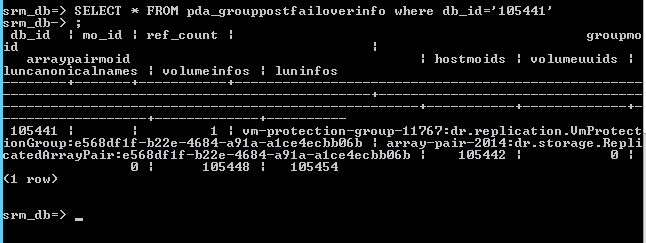
5. Delete the stale entry by using the below command.
-
- DELETE FROM pda_grouppostfailoverinfo where db_id=’105441′;
Start the SRM service now in both the sites and validate.
 virtuSolve